Viewport Size: a tiny Chrome extension for seeing your viewport dimensions
24th January 2026
I test responsive designs constantly. Chrome DevTools can do this, but I wanted something simpler. Just the current viewport width and height, visible at all times, updating as I drag the window edge.
I looked at Viewport Resizer and Window Resizer. Both seemed heavier than I needed. I also couldn’t easily verify what data they collect.
So I built my own.
How it works
The extension injects a small overlay into every page showing width × height in pixels. It updates as you resize. The overlay turns blue while you’re actively dragging, which helps me know when I’ve stopped.

Click the extension icon and you get a popup with device presets:
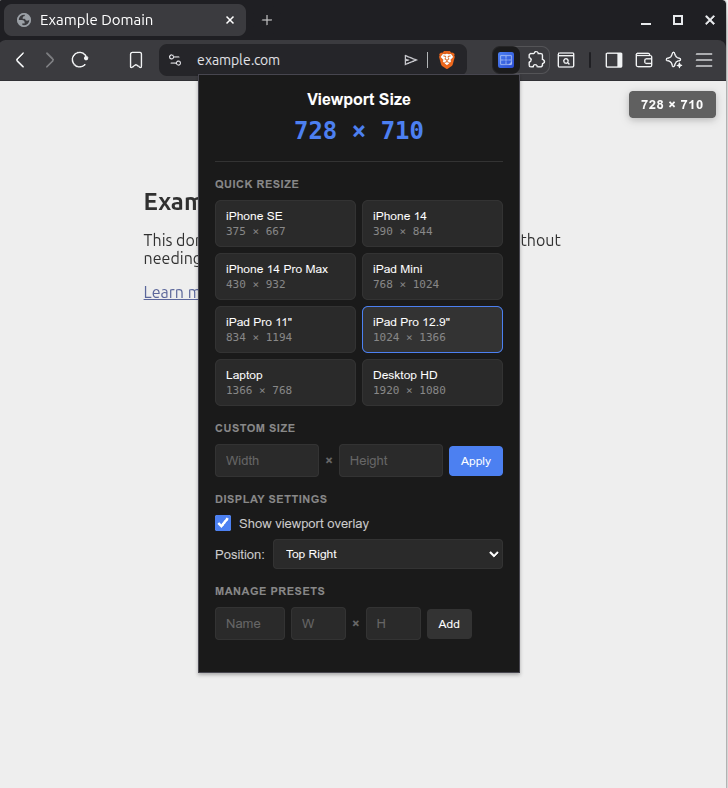
There are quick resize presets for: iPhone SE, iPhone 14, iPhone 14 Pro Max, iPad Mini, iPad Pro 11” and 12.9”, plus laptop (1366×768) and desktop HD (1920×1080). You can add your own presets for project-specific breakpoints. They persist via chrome.storage.sync.
No telemetry
This was the main reason I built it myself.
The extension makes zero network requests. No analytics. No telemetry. Works completely offline. The only permissions it needs are activeTab (to inject the overlay) and storage (to remember your settings).
Settings sync across your Chrome profile if you’re signed in, but that’s Chrome’s built-in sync. Nothing goes to any third-party server. The code is Apache-2.0 licensed.
Installation
git clone https://github.com/micahstubbs/viewport-size.git
Then in Chrome:
1. Go to chrome://extensions
2. Enable Developer mode (toggle in top-right)
3. Click Load unpacked and select the viewport-size folder
Source
Repository: github.com/micahstubbs/viewport-size
If you do responsive work and want something lightweight that doesn’t phone home, grab it.
Recent articles
- Cleaning up taskmaster's terminal output - 25th February 2026
- Building a functional consciousness eval suite for LLMs - 8th February 2026
- Claude Code starts faster on Ubuntu when installed via Homebrew - 26th January 2026